Crop planner program V1.5.0.0 FS25

Crop planner program V1.5.0.0 FS25
KTD AGRAR Crop Planner – Windows add-on program for FS25
Plan your next harvest directly on the map.
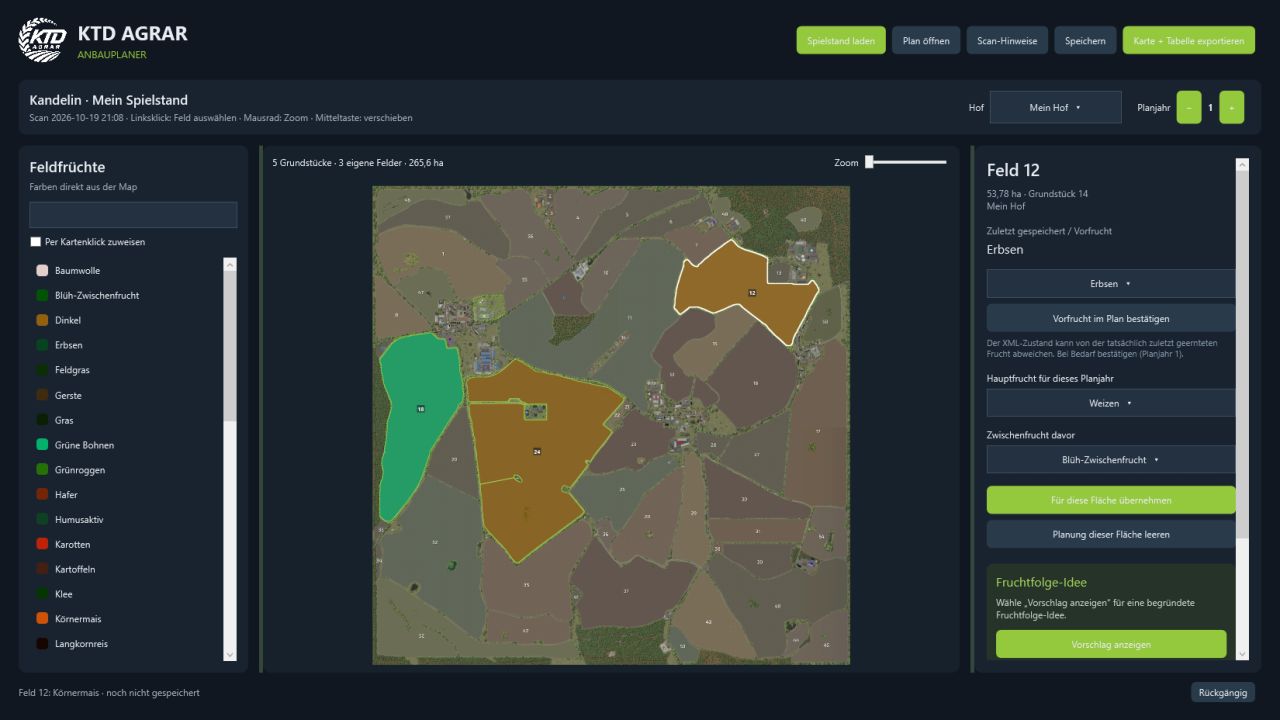
The KTD AGRAR Crop Planner is a free, standalone Windows program for crop planning in Farming Simulator 25. Load a savegame, select your farm and plan main crops as well as cover crops for your own fields – clearly displayed on an interactive map in the dark KTD design.
IMPORTANT: This is NOT a mod for Farming Simulator. The EXE is launched outside the game and does NOT belong in the Mods folder. The program does not alter your savegame or your map. Actual sowing still takes place in the game.
FEATURES
Read savegames as folders or ZIP files.
Automatically detect the matching standard or mod map when it is available locally.
Display your own plots and fields on a zoomable, pannable map.
Use available crops and map colors from the readable map data.
Set main crops and optional cover crops for each field and planning year.
Assign crops directly by clicking on the map.
Display the saved crop state and manually correct previous crops in the plan.
Display reasoned crop rotation ideas to support game planning.
Save multiple planning years in a separate .ktdplan file and continue editing them later.
Export a color map with a cropping table as PNG, as well as the plan as CSV.
German and English interface with a DE/US flag switch, without restarting.
Dark design, adjustable sidebars and undo function.
INSTALLATION
Extract the download ZIP into a separate folder and start KTD-AGRAR-Crop-Planner.exe.
No additional .NET installation, account or online service is required.
German and English instructions are included.
REQUIREMENTS AND COMPATIBILITY
Windows 10/11, 64-bit. The first scan requires an FS25 savegame and the locally
available data of the matching map. The three standard maps as well as
Kandelin have been tested. Other mod maps can be used provided that their
data structures are supported. The map must match the savegame version.
NOTES
The crop state read from fields.xml is not a complete harvest history and
may differ from the crop actually harvested last. Newly created or
merged fields are not automatically detected from binary density maps.
Crop rotation suggestions are simplified planning aids for the game.
The application is currently not digitally signed.
An unofficial community add-on program by KTD AGRAR – not an official
GIANTS product and not an extension installed into the game.
Version: 1.4.0 · Languages: German / English · Platform: Windows x64
V1.5.0.0
Bug Fixes
KTDAGRAR